We're sorry, but you must log in to view this page.

2026 Allianz Field Training Requirements

There are two main parts to 2026 Allianz Field Training. 

Part 1 is a bundle of Delaware North corporate training modules, such as 4 Key Elements of Service Delivery (GuestPath), Food Safety, Alcohol Training, Onboarding Safety, and PCI Compliance. 

Part 2 are Allianz Field-specific items like Unit Training and Quiz and various waivers. 

Training is hosted and managed by Delaware North via their Workday learning platform. The following is an overview of the process:

  • Invitation: Achieving Dreams submits our volunteer roster to Delaware North. You will receive an automated email from their system with instructions to begin your training.

  • Verification: Delaware North provides periodic completion reports to Achieving Dreams.

  • Updates: We will update your status in the Training Center within two business days of receiving verification from the venue.

These courses take approximately 60 minutes together.

There will be no need to upload training proofs to Achieving Dreams.

You will receive a series of emails from Workday (not Achieving Dreams or Delaware North).  Please make sure to monitor your junk or spam folders.

Email 1 & 2

These emails will contain your Workday username and a temporary password and the link to their system.
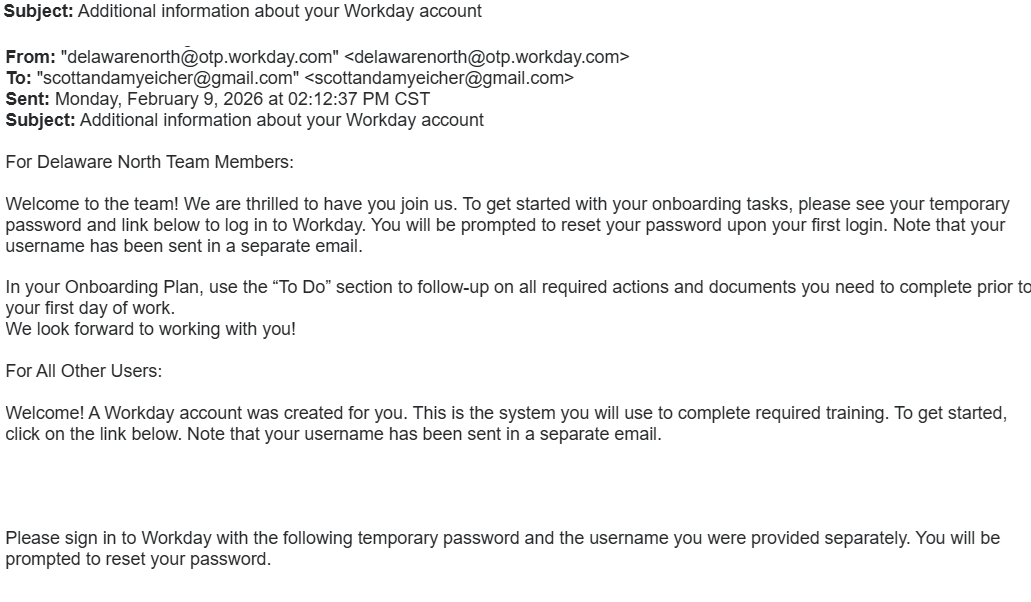
Email #1: Username and Links

Email 1: Username and Links

Email #2: Temporary Password

Corporate Training (Email 3)

The actual corporate training information comes in email #3.  This will be common between Target Field and Allianz Field – you only have to do this part one time – it is common between both venues.
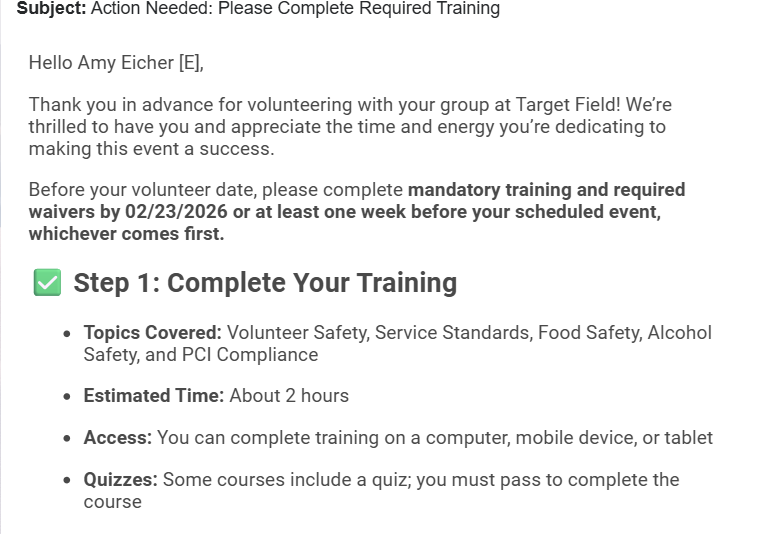
Email #3: Corporate TrainingEmail 3: Corporate Training
 

Status Updates

As training components are done, the venues will update Achieving Dreams.  We will then load your training information in our site, and you can observe your status from the Training Center.  

Allianz Field Unit Training Links

The specific links for Allianz Field Unit Training are listed below.  These are also found in email #4, but can be accessed directly.

Waivers

Volunteers 18+

Allianz Field Volunteer Release, Waiver, Indemnification & Arbitration Agreement: 18+
Allianz Field Alcohol Service Training Certification Acknowledgement Form: 18+

If you are volunteering at both Target Field and Allianz Field, you must complete waivers for both venues, as they are not the same.

Unit Training

CLICK HERE FOR ALLIANZ FIELD UNIT TRAINING

Special Notice for Managers & Stand Leads

Important Requirement Change: Allianz Field management has updated the approval process for Stand Leads. Managers must now be experienced with the location concept you will be managing and pre-approved to lead.

  • Approval Process: This may include a review of prior experience or additional venue-specific training.

  • ServSafe Requirement: All Managers must hold a valid ServSafe certification (3-hour course) in addition to the standard training modules listed above.

For questions regarding management eligibility, contact training@achievingdreamsmn.org.

Status Updates

As training components are done, the venues will update Achieving Dreams.  We will then load your training information in our site, and you can observe your status from the Training Center.  

Canterbury Park Training

Canterbury Park requires completion of a recognized food safety training and alcohol training (for adults). 

Volunteers qualified for any of the following venues will automatically be qualified for Canterbury Park.

  • Allianz Field
  • CHS Field
  • Grand Casino Arena
  • U of M/Gophers
  • Target Field
  • Target Center 

A nightly web site process synchronizes these training qualifications with Canterbury Park, so if you just recently obtained a certificate, Canterbury Park should be active the next day.   If you have any questions, please contact  training@achievingdreamsmn.org.


CHS Field Training has three parts for the 2026 season!

Those 3 parts are follows: 1. Creating Legends Orientation (taken after March 1, 2026) 2. Volunteer Policy Acknowledgement Workbook 3. ServSafe Alcohol Certification.  NOTE: If you already have a valid ServSafe certificate you will not have to obtain a new one.

Part 1 – Creating Legends Orientation

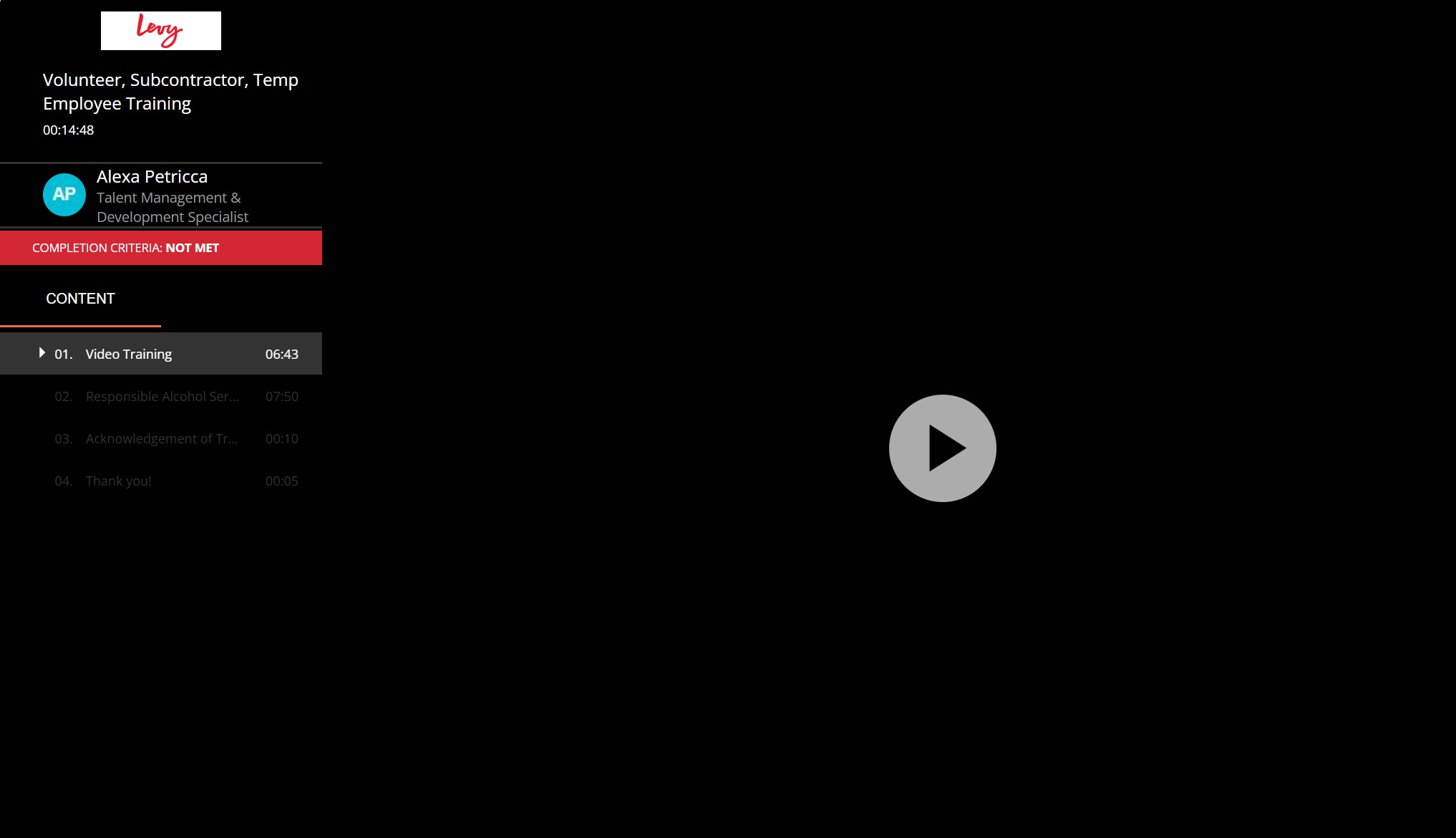
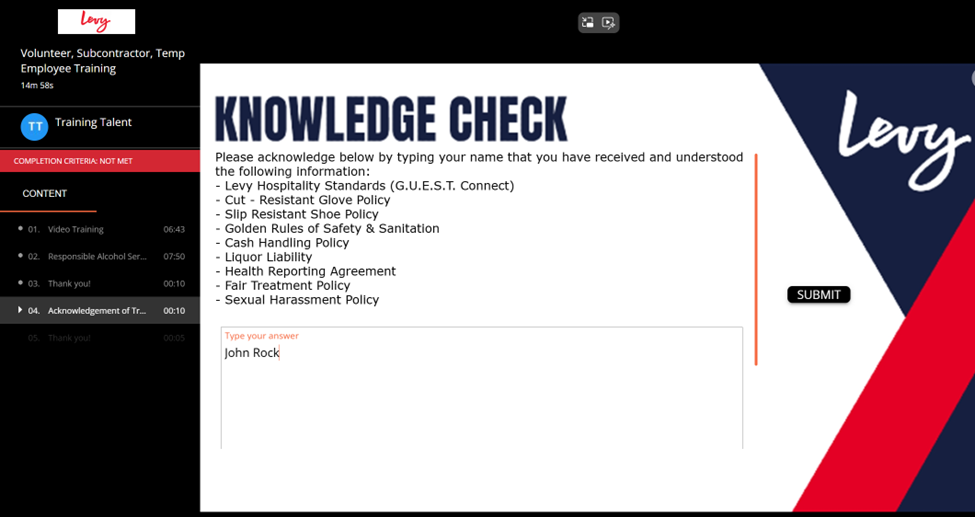
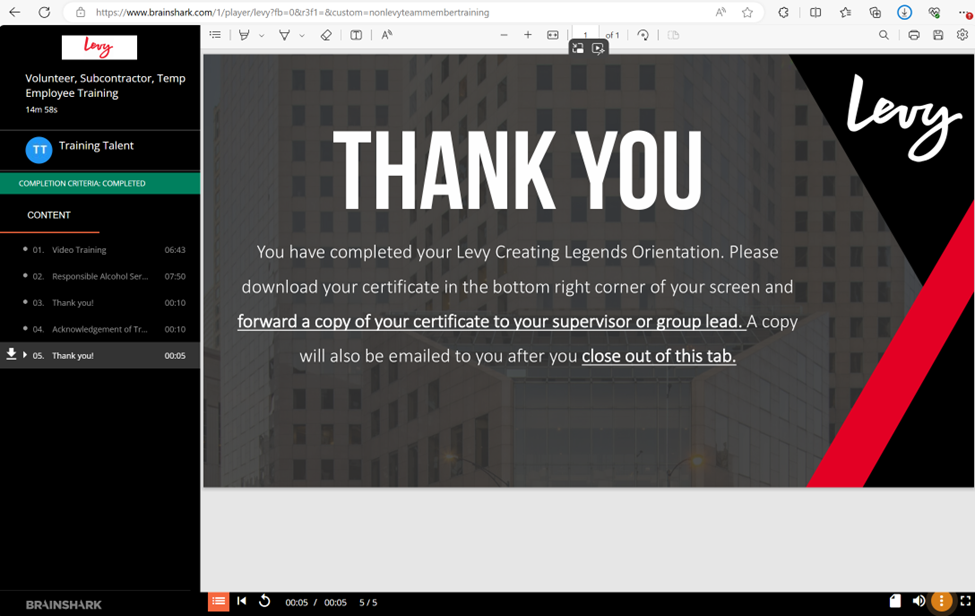
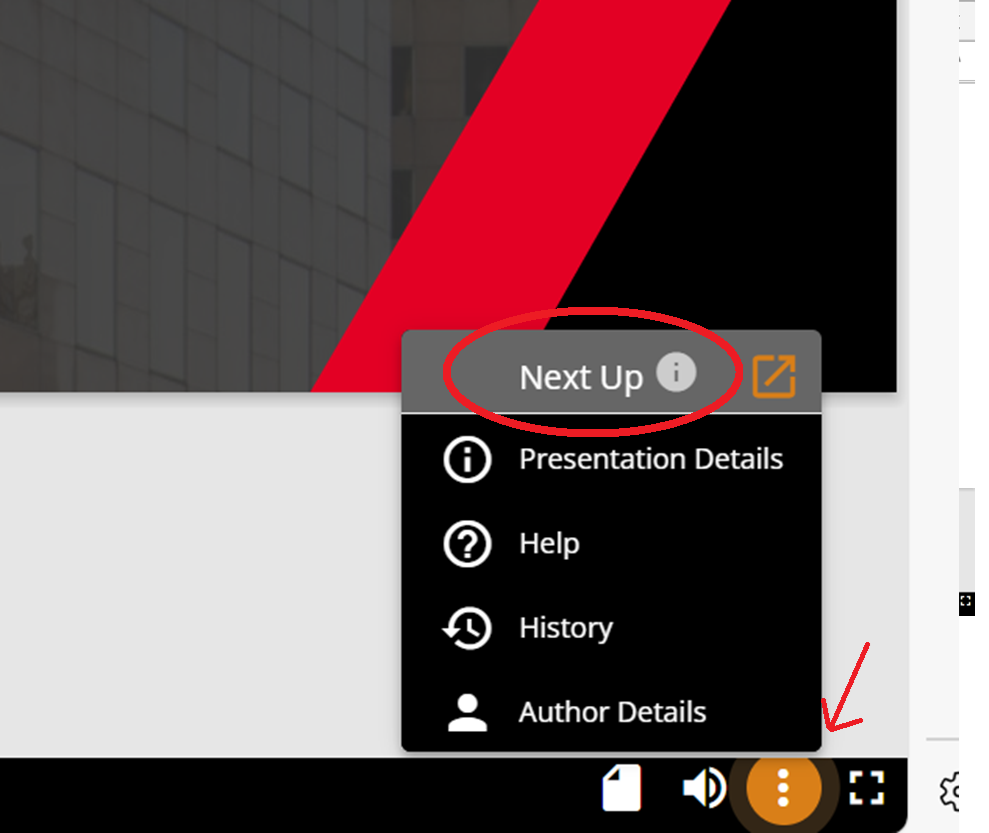
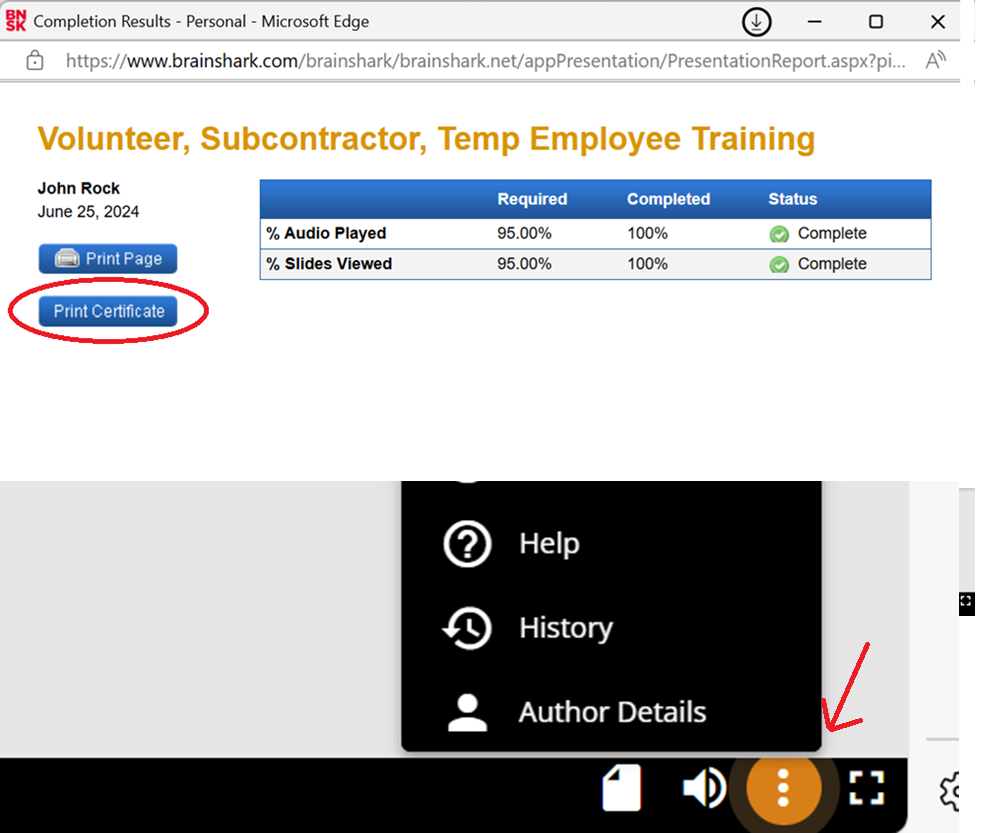
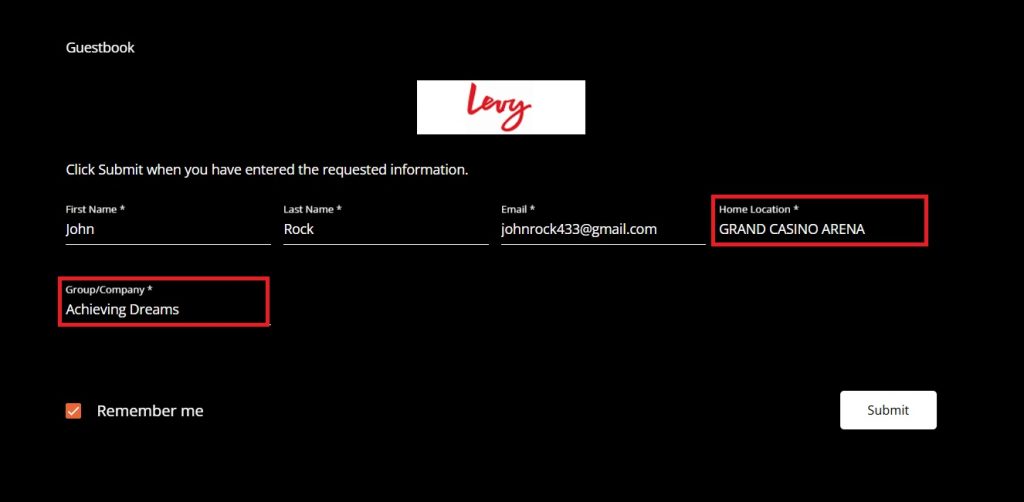
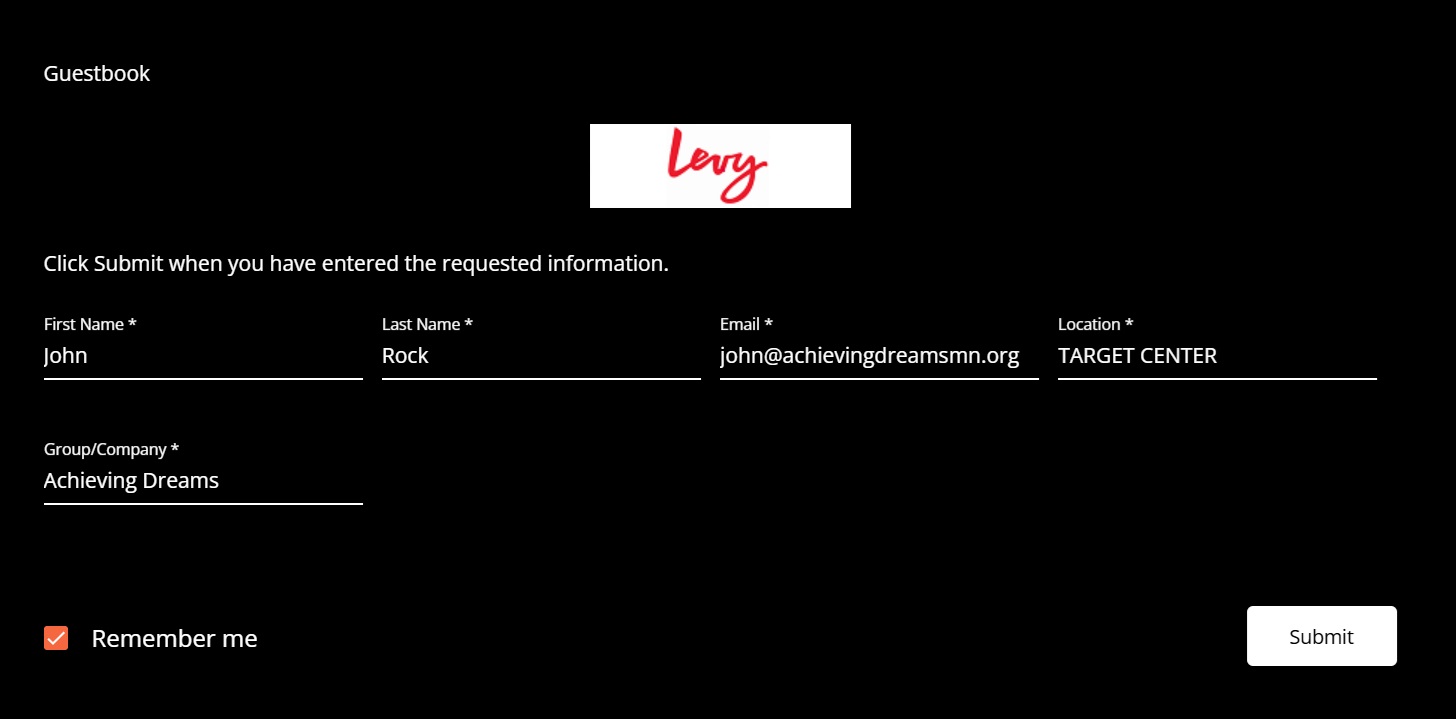
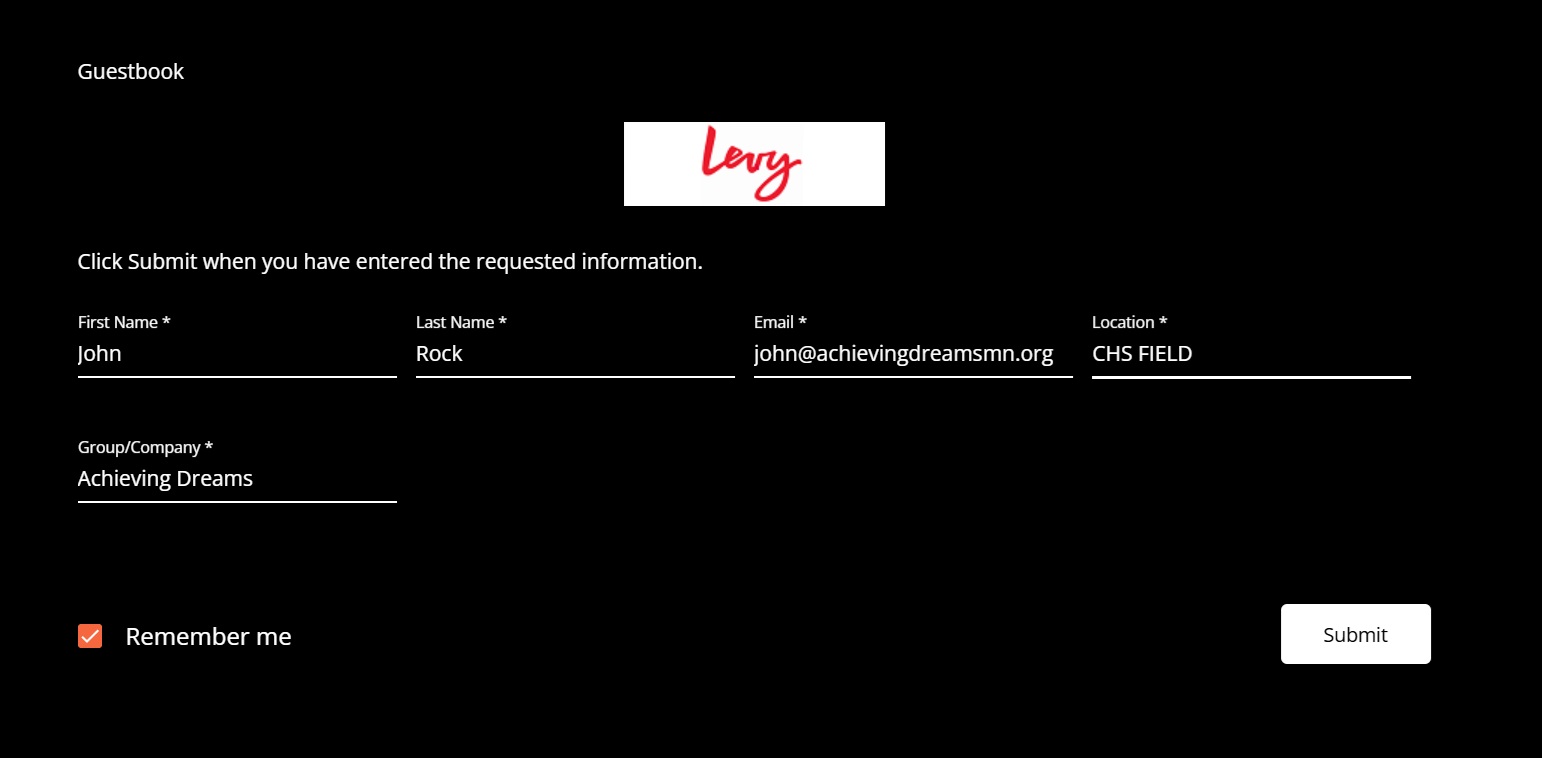
Go to https://www.brainshark.com/levy/nonlevyteammembertraining Fill in your specific information and use CHS FIELD as the location & Achieving Dreams as the Group Name.  All other fields will be specific to you! Click Submit. Watch the Training Video and Responsible Alcohol Service. This will take about 20 minutes, as you will need to pause the video at several spots to make sure you understand all the points presented in the videos. You will then need to type your name at the Knowledge Check screen and click the black Submit button. To get you certificate, you will need to click the orange button (with the ellipsis) in the lower right, hand corner of the screen. After clicking the Orange button, choose “Next Up”

On the next screen, select Print Certificate – which will download copy of the certificate to your device.  Screen shots will not accepted by the venue, it must be a PDF. IMPORTANT: Submit your PDF using the button found on the training center page, under CHS Field.

Part 2 – Volunteer Policy Acknowledgement Workbook (CHS Field Signing Packet)

Please download and review the 2026 (Eng) NPO-Temp-Subcon Workbook. After reading the workbook, you must sign the Acknowledgement/Signing Packet. Under the SUBMIT TRAINING DOCUMENTS for CHS Field, click the blue submit button to the right of the CHS Field Signing Packet line. You will receive a copy of your signed document for your reference and Achieving Dreams will receive a copy. You do not need to forward anything. You will be expected to follow all these policies and will lose your opportunity to volunteer at CHS Field if you do not follow these policies.

Part 3 – ServSafe Alcohol Certification

If you need ServSafe certification, please follow the instructions below.

The ServSafe Alcohol Service Training is a comprehensive three-hour program required for all volunteers at several of our venues. Additionally, this certification is a mandatory requirement for managers at Allianz Field.


ServSafe Alcohol Training Instructions

Every volunteer is responsible for creating their own account and paying for their training directly through ServSafe.  At the end of this process, you must download a PDF to submit back to us as documentation of your certification. 

Steps to Purchase Your Course

  1. Create a Profile: Visit www.servsafe.com and select “Create Account.”
    If you already have a profile, simply log in.
  2. Access Alcohol Section: After you are logged in, click on ServSafe Alcohol on the top navigation bar.

ServSafe Top Navigation

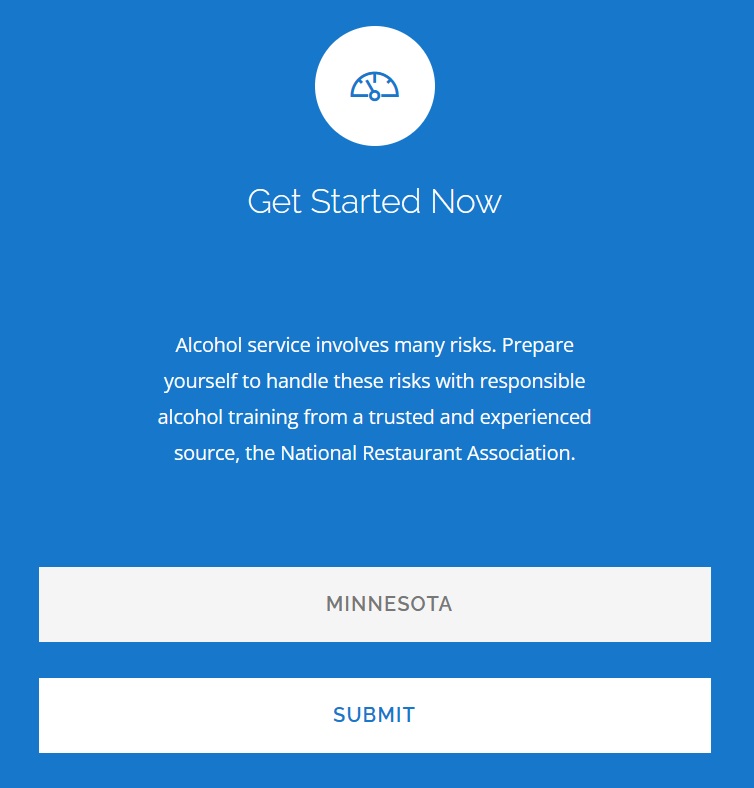
  1. Select Your Location: Enter MINNESOTA for the state and click Submit.

Select Minnesota

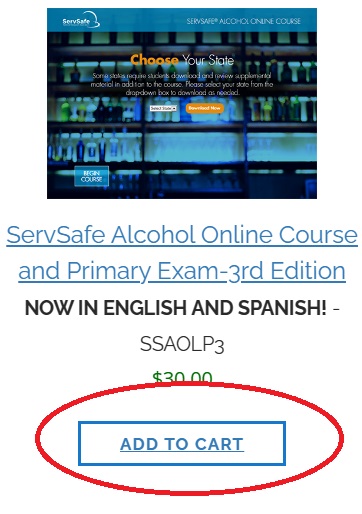
  1. Add to Cart: Add the ServSafe Alcohol Online Course and Primary Exam – 3rd Edition to your cart.

Shopping Cart

  1. Apply Discount (Levy Venues Only): Click “View Your Cart.” If you are training for a Levy venue (Target Center, Grand Casino Arena, or CHS Field), enter LEVY23 in the coupon code field and click Apply Coupon.

    Note: This code gives you a 32% discount.

Please Note: This code is exclusively for Levy locations and use is strictly tracked. Unauthorized sharing or use of this code may result in the dismissal of the individual volunteer and their associated non-profit group.

  1. Checkout: Click Checkout, enter your payment information, and select Continue to finish your purchase.

Step-by-Step: Completing Your Training

Phase 1: The Online Course

  • Access the Training: Hover over ServSafe Alcohol in the top menu and select “Take Online Course.”
  • Start Training: Locate the ServSafe Alcohol course in your dashboard and click “Launch.”
  • Complete Modules: Finish all training modules to prepare for the final test.

Phase 2: The Final Exam

  • Start the Exam: Once the course is finished, click on “Take Online Exam.”
  • Select Exam Type: Choose the “Primary ServSafe Alcohol Exam.”
  • Begin: Your exam access code should populate automatically. Click “Continue” to start.

After the Exam

  • Results: You will be notified immediately if you passed or failed.
  • Get Your Certificate: After 48 hours, your certificate will be ready. To download it, go to Certificates, then select View/Print Certificates.  From this screen, save this – it will be in the required PDF format to upload later.
  • Validity: Your certification is valid for three (3) years.

How to Submit Your Certificate

Once you pass the test and download the certificate as a PDF, you must upload it to our system.

  1. Go to our Training Center.
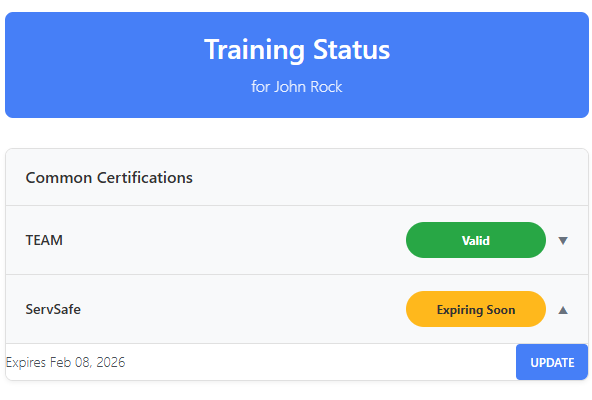
  2. Find the ServSafe row and expand it to reveal the Submit or Update button.

Submit Button

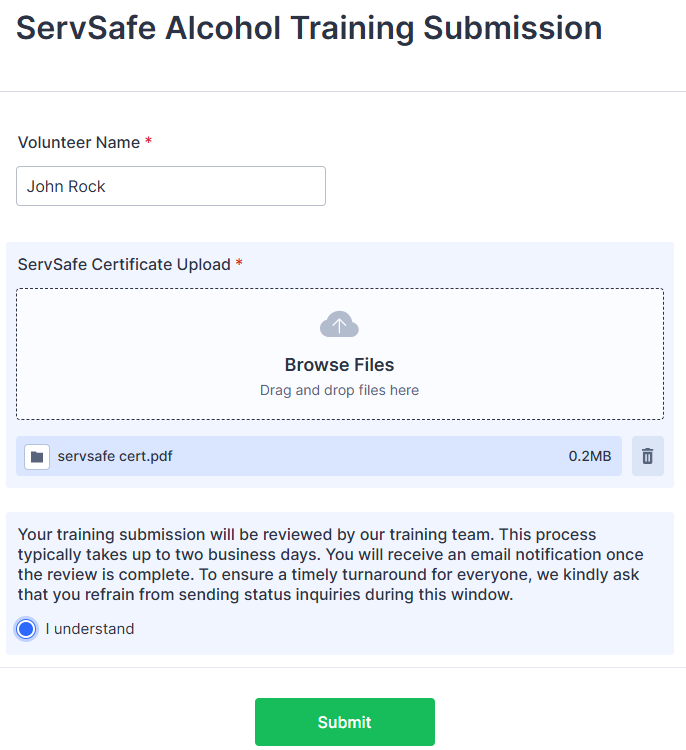
This will open a JotForm where you can Drag and Drop or browse to your ServSafe Certificate PDF. Click the box acknowledging our standard processing time to reveal the Submit button.

JotForm Upload

You will receive email updates regarding your submission. Once approved, your status will be reflected in the Training Center. If there is a problem with your submission, we will reach out to you.

Once both proofs are submitted, the system will notify training@achievingdreamsmn.org.   Watch your email and observe your training status in the Training Center.

Grand Casino Arena Training has three parts for the 2025-2026 season!

Those 3 parts are follows:
1. Creating Legends Orientation (taken after September 10, 2025)
2. Volunteer Policy Acknowledgement Workbook
3. ServSafe Alcohol Certification.  NOTE: If you already have a valid ServSafe certificate you will not have to obtain a new one. 

Part 1 – Creating Legends Orientation

Go to https://www.brainshark.com/levy/nonlevyteammembertraining

Fill in your specific information and use GRAND CASINO ARENA as the location & Achieving Dreams as the Group Name.  All other fields will be specific to you!

Click Submit.

Watch the Training Video and Responsible Alcohol Service.

This will take about 20 minutes, as you will need to pause the video at several spots to make sure you understand all the points presented in the videos.

You will then need to type your name at the Knowledge Check screen and click the black Submit button.

To get you certificate, you will need to click the orange button (with the ellipsis) in the lower right, hand corner of the screen.

After clicking the Orange button, choose “Next Up”

On the next screen, select Print Certificate – which will download copy of the certificate to your device.  Screen shots will not accepted by the venue, it must be a PDF.

IMPORTANT: Submit your PDF using the button found on the training center page, under Grand Casino Arena. 

Part 2 – Volunteer Policy Acknowledgement Workbook

Under the SUBMIT TRAINING DOCUMENTS for Grand Casino Arena, click the blue submit button to the right of the Grand Casino Signing Packet line.  

You will receive a copy of your signed packet for your reference and Achieving Dreams will receive a copy. You do not need to forward anything, but READ the whole document once you receive it. You will be expected to follow all these policies and will lose your opportunity to volunteer at Grand Casino Arena if you do not follow these policies.

Part 3 – ServSafe Alcohol Certification

If you need ServSafe certification, please follow the instructions below.

The ServSafe Alcohol Service Training is a comprehensive three-hour program required for all volunteers at several of our venues. Additionally, this certification is a mandatory requirement for managers at Allianz Field.


ServSafe Alcohol Training Instructions

Every volunteer is responsible for creating their own account and paying for their training directly through ServSafe.  At the end of this process, you must download a PDF to submit back to us as documentation of your certification. 

Steps to Purchase Your Course

  1. Create a Profile: Visit www.servsafe.com and select “Create Account.”
    If you already have a profile, simply log in.
  2. Access Alcohol Section: After you are logged in, click on ServSafe Alcohol on the top navigation bar.

ServSafe Top Navigation

  1. Select Your Location: Enter MINNESOTA for the state and click Submit.

Select Minnesota

  1. Add to Cart: Add the ServSafe Alcohol Online Course and Primary Exam – 3rd Edition to your cart.

Shopping Cart

  1. Apply Discount (Levy Venues Only): Click “View Your Cart.” If you are training for a Levy venue (Target Center, Grand Casino Arena, or CHS Field), enter LEVY23 in the coupon code field and click Apply Coupon.

    Note: This code gives you a 32% discount.

Please Note: This code is exclusively for Levy locations and use is strictly tracked. Unauthorized sharing or use of this code may result in the dismissal of the individual volunteer and their associated non-profit group.

  1. Checkout: Click Checkout, enter your payment information, and select Continue to finish your purchase.

Step-by-Step: Completing Your Training

Phase 1: The Online Course

  • Access the Training: Hover over ServSafe Alcohol in the top menu and select “Take Online Course.”
  • Start Training: Locate the ServSafe Alcohol course in your dashboard and click “Launch.”
  • Complete Modules: Finish all training modules to prepare for the final test.

Phase 2: The Final Exam

  • Start the Exam: Once the course is finished, click on “Take Online Exam.”
  • Select Exam Type: Choose the “Primary ServSafe Alcohol Exam.”
  • Begin: Your exam access code should populate automatically. Click “Continue” to start.

After the Exam

  • Results: You will be notified immediately if you passed or failed.
  • Get Your Certificate: After 48 hours, your certificate will be ready. To download it, go to Certificates, then select View/Print Certificates.  From this screen, save this – it will be in the required PDF format to upload later.
  • Validity: Your certification is valid for three (3) years.

How to Submit Your Certificate

Once you pass the test and download the certificate as a PDF, you must upload it to our system.

  1. Go to our Training Center.
  2. Find the ServSafe row and expand it to reveal the Submit or Update button.

Submit Button

This will open a JotForm where you can Drag and Drop or browse to your ServSafe Certificate PDF. Click the box acknowledging our standard processing time to reveal the Submit button.

JotForm Upload

You will receive email updates regarding your submission. Once approved, your status will be reflected in the Training Center. If there is a problem with your submission, we will reach out to you.

Once all three proofs are submitted, the system will notify training@achievingdreamsmn.org.   Watch your email and observe your training status in the Training Center. 

University of MN/Gopher Training is done for the year. 

We should start training for the 2026 season in July or August.

MN Zoo Training

If you want to volunteer at the MN Zoo for 2025, you need to have valid ServSafe training.   If you already have valid ServSafe training on file, send an email to training@achievingdreamsmn.org and ask to have you MN Zoo training activated.

ServSafe Alcohol Certification

If you need ServSafe certification, please follow the instructions below.

The ServSafe Alcohol Service Training is a comprehensive three-hour program required for all volunteers at several of our venues. Additionally, this certification is a mandatory requirement for managers at Allianz Field.


ServSafe Alcohol Training Instructions

Every volunteer is responsible for creating their own account and paying for their training directly through ServSafe.  At the end of this process, you must download a PDF to submit back to us as documentation of your certification. 

Steps to Purchase Your Course

  1. Create a Profile: Visit www.servsafe.com and select “Create Account.”
    If you already have a profile, simply log in.
  2. Access Alcohol Section: After you are logged in, click on ServSafe Alcohol on the top navigation bar.

ServSafe Top Navigation

  1. Select Your Location: Enter MINNESOTA for the state and click Submit.

Select Minnesota

  1. Add to Cart: Add the ServSafe Alcohol Online Course and Primary Exam – 3rd Edition to your cart.

Shopping Cart

  1. Apply Discount (Levy Venues Only): Click “View Your Cart.” If you are training for a Levy venue (Target Center, Grand Casino Arena, or CHS Field), enter LEVY23 in the coupon code field and click Apply Coupon.

    Note: This code gives you a 32% discount.

Please Note: This code is exclusively for Levy locations and use is strictly tracked. Unauthorized sharing or use of this code may result in the dismissal of the individual volunteer and their associated non-profit group.

  1. Checkout: Click Checkout, enter your payment information, and select Continue to finish your purchase.

Step-by-Step: Completing Your Training

Phase 1: The Online Course

  • Access the Training: Hover over ServSafe Alcohol in the top menu and select “Take Online Course.”
  • Start Training: Locate the ServSafe Alcohol course in your dashboard and click “Launch.”
  • Complete Modules: Finish all training modules to prepare for the final test.

Phase 2: The Final Exam

  • Start the Exam: Once the course is finished, click on “Take Online Exam.”
  • Select Exam Type: Choose the “Primary ServSafe Alcohol Exam.”
  • Begin: Your exam access code should populate automatically. Click “Continue” to start.

After the Exam

  • Results: You will be notified immediately if you passed or failed.
  • Get Your Certificate: After 48 hours, your certificate will be ready. To download it, go to Certificates, then select View/Print Certificates.  From this screen, save this – it will be in the required PDF format to upload later.
  • Validity: Your certification is valid for three (3) years.

How to Submit Your Certificate

Once you pass the test and download the certificate as a PDF, you must upload it to our system.

  1. Go to our Training Center.
  2. Find the ServSafe row and expand it to reveal the Submit or Update button.

Submit Button

This will open a JotForm where you can Drag and Drop or browse to your ServSafe Certificate PDF. Click the box acknowledging our standard processing time to reveal the Submit button.

JotForm Upload

You will receive email updates regarding your submission. Once approved, your status will be reflected in the Training Center. If there is a problem with your submission, we will reach out to you.

Mystic Lake Amphitheater Training has two parts for 2026.

Those 2 parts are follows:
  1. Minnesota Alcohol Seller Server Course – This is a new requirement for Mystic Lake mandated by their insurance. All volunteers must complete this specific alcohol training – effective July 1,2026.
  2. Achieving Dreams Food Safety (currently automatically derived from one of the following training certifications)
    • Current Delaware North Food Safety Training (part of required training for Allianz and Target Field)
    • Levy Creating Legends (part of training for CHS, GCA and Target Center

Part 1 – Minnesota Alcohol Seller/Server Course

The Minnesota Alcohol Seller Server Course from servingalcohol.com is a comprehensive two-hour program required for all volunteers at Mystic Lake Amphitheater.


Minnesota Alcohol Seller Server Instructions

Every volunteer is responsible for creating their own account and paying for their training directly through servingalcohol.com.  At the end of this process, you must download a PDF to submit back to us as documentation of your certification.

  1. Open https://servingalcohol.com/minnesota-alcohol-seller-server-course/
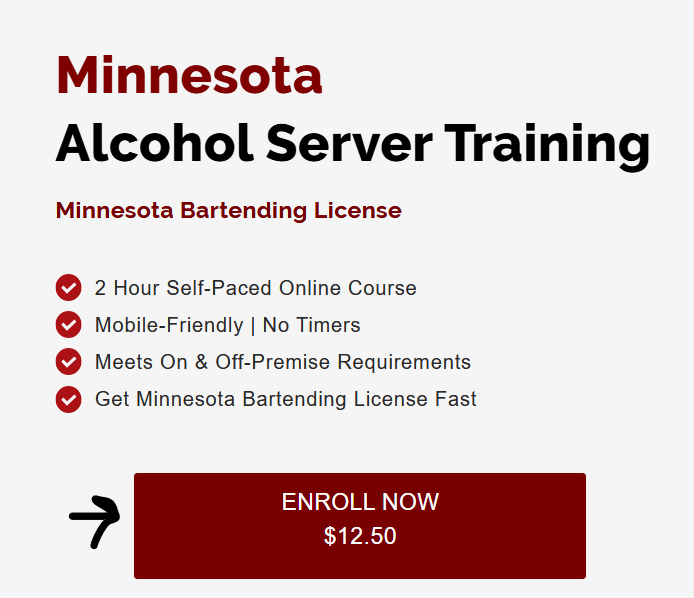
  2. Click the Enroll Now button
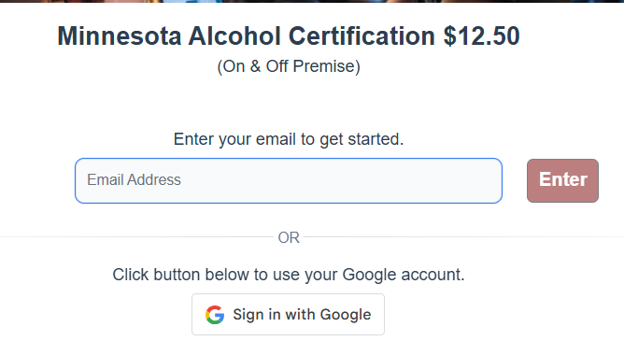
  1. Enter your email address

  1. Click on the red Purchase Course button

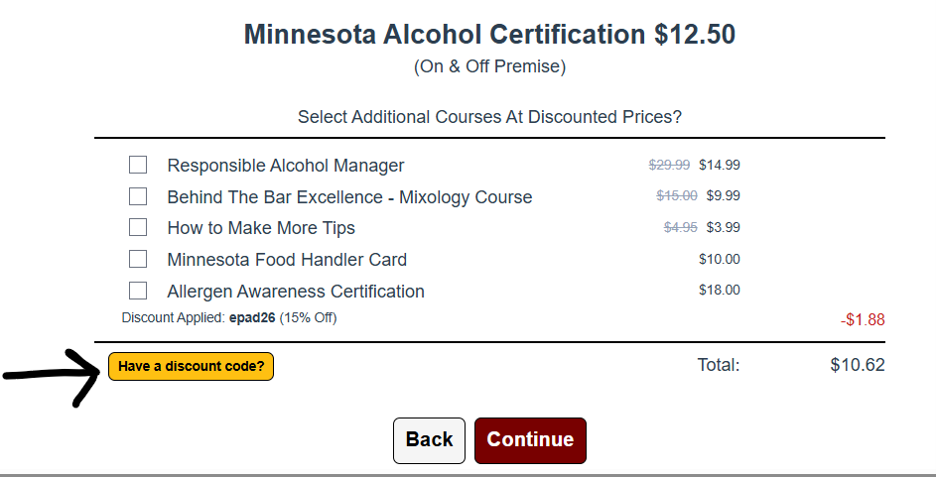
  1. Click the “Have a discount code” button button


  1. Enter discount code epad26 and click Apply
  2. Click the red Continue Button
  3. Enter your payment information and click the red Complete Purchase button
  4. Enter your personal information (including date of birth)
  5. Start the Alcohol Seller Server Course
  6. Complete the training, take the test, download a copy of your certificate
  7. Upload your certificate using the Submit button located under the Common Certifications within the Training Center on the Achieving Dreams web site.

If you have any questions, please direct them to training@achievingdreamsmn.org.

Part 2 – Achieving Dreams Food Safety

Complete one of the other eligible venue trainings.
  • Current Delaware North Food Safety Training (part of required training for Allianz and Target Field)
  • Levy Creating Legends (part of training for CHS, GCA and Target Center
If you have any questions, please direct them to training@achievingdreamsmn.org.

Somerset Training is done for the year. 

We should start training for the 2026 season in April or May 2026.

Target Center Training has three parts for the 2025-2026 season!

Those 3 parts are follows:
1. Creating Legends Orientation (taken after September 10, 2025)
2. Volunteer Policy Acknowledgement Workbook
3. ServSafe Alcohol Certification.  NOTE: If you already have a valid ServSafe certificate you will not have to obtain a new one. 

Part 1 – Creating Legends Orientation

Go to https://www.brainshark.com/levy/nonlevyteammembertraining

Fill in your specific information and use TARGET CENTER as the location & Achieving Dreams as the Group Name.
All other fields will be specific to you!

Click Submit.

Watch the Training Video and Responsible Alcohol Service.

This will take about 20 minutes, as you will need to pause the video at several spots to make sure you understand all the points presented in the videos.

You will then need to type your name at the Knowledge Check screen and click the black Submit button.

To get you certificate, you will need to click the orange button (with the ellipsis) in the lower right, hand corner of the screen.

After clicking the Orange button, choose “Next Up”

On the next screen, select Print Certificate – which will download copy of the certificate to your device.  Screen shots are not accepted by the venue, it must be a PDF.

Submit your PDF using the button found on the training center page, under Grand Casino Arena. 

Part 2 – Volunteer Policy Acknowledgement Workbook

Under the SUBMIT TRAINING DOCUMENTS for Target Center, click the blue submit button to the right of the Target Center Signing Packet line.  

You will receive a copy of your signed packet for your reference and Achieving Dreams will receive a copy. You do not need to forward anything, but READ the whole document once you receive it. You will be expected to follow all these policies and will lose your opportunity to volunteer at Target Center if you do not follow these policies.

Part 3 – ServSafe Alcohol Certification

If you need ServSafe certification, please follow the instructions below.

The ServSafe Alcohol Service Training is a comprehensive three-hour program required for all volunteers at several of our venues. Additionally, this certification is a mandatory requirement for managers at Allianz Field.


ServSafe Alcohol Training Instructions

Every volunteer is responsible for creating their own account and paying for their training directly through ServSafe.  At the end of this process, you must download a PDF to submit back to us as documentation of your certification. 

Steps to Purchase Your Course

  1. Create a Profile: Visit www.servsafe.com and select “Create Account.”
    If you already have a profile, simply log in.
  2. Access Alcohol Section: After you are logged in, click on ServSafe Alcohol on the top navigation bar.

ServSafe Top Navigation

  1. Select Your Location: Enter MINNESOTA for the state and click Submit.

Select Minnesota

  1. Add to Cart: Add the ServSafe Alcohol Online Course and Primary Exam – 3rd Edition to your cart.

Shopping Cart

  1. Apply Discount (Levy Venues Only): Click “View Your Cart.” If you are training for a Levy venue (Target Center, Grand Casino Arena, or CHS Field), enter LEVY23 in the coupon code field and click Apply Coupon.

    Note: This code gives you a 32% discount.

Please Note: This code is exclusively for Levy locations and use is strictly tracked. Unauthorized sharing or use of this code may result in the dismissal of the individual volunteer and their associated non-profit group.

  1. Checkout: Click Checkout, enter your payment information, and select Continue to finish your purchase.

Step-by-Step: Completing Your Training

Phase 1: The Online Course

  • Access the Training: Hover over ServSafe Alcohol in the top menu and select “Take Online Course.”
  • Start Training: Locate the ServSafe Alcohol course in your dashboard and click “Launch.”
  • Complete Modules: Finish all training modules to prepare for the final test.

Phase 2: The Final Exam

  • Start the Exam: Once the course is finished, click on “Take Online Exam.”
  • Select Exam Type: Choose the “Primary ServSafe Alcohol Exam.”
  • Begin: Your exam access code should populate automatically. Click “Continue” to start.

After the Exam

  • Results: You will be notified immediately if you passed or failed.
  • Get Your Certificate: After 48 hours, your certificate will be ready. To download it, go to Certificates, then select View/Print Certificates.  From this screen, save this – it will be in the required PDF format to upload later.
  • Validity: Your certification is valid for three (3) years.

How to Submit Your Certificate

Once you pass the test and download the certificate as a PDF, you must upload it to our system.

  1. Go to our Training Center.
  2. Find the ServSafe row and expand it to reveal the Submit or Update button.

Submit Button

This will open a JotForm where you can Drag and Drop or browse to your ServSafe Certificate PDF. Click the box acknowledging our standard processing time to reveal the Submit button.

JotForm Upload

You will receive email updates regarding your submission. Once approved, your status will be reflected in the Training Center. If there is a problem with your submission, we will reach out to you.

Once all three proofs are submitted and approved, the system will take care of submitting your training proofs to Target Center.

 Watch your email and observe your training status in the Training Center. 

Target Center Training has three parts for the 2025-2026 season!

Those 3 parts are follows:
1. Creating Legends Orientation (taken after September 10, 2025)
2. Volunteer Policy Acknowledgement Workbook
3. ServSafe Alcohol Certification.  NOTE: If you already have a valid ServSafe certificate you will not have to obtain a new one. 

Part 1 – Creating Legends Orientation

Go to https://www.brainshark.com/levy/nonlevyteammembertraining

Fill in your specific information and use TARGET CENTER as the location & Achieving Dreams as the Group Name.
All other fields will be specific to you!

Click Submit.

Watch the Training Video and Responsible Alcohol Service.

This will take about 20 minutes, as you will need to pause the video at several spots to make sure you understand all the points presented in the videos.

You will then need to type your name at the Knowledge Check screen and click the black Submit button.

To get you certificate, you will need to click the orange button (with the ellipsis) in the lower right, hand corner of the screen.

After clicking the Orange button, choose “Next Up”

On the next screen, select Print Certificate – which will download copy of the certificate to your device.  Screen shots are not accepted by the venue, it must be a PDF.

Submit your PDF using the button found on the training center page, under Grand Casino Arena. 

Part 2 – Volunteer Policy Acknowledgement Workbook

Under the SUBMIT TRAINING DOCUMENTS for Target Center, click the blue submit button to the right of the Target Center Signing Packet line.  

You will receive a copy of your signed packet for your reference and Achieving Dreams will receive a copy. You do not need to forward anything, but READ the whole document once you receive it. You will be expected to follow all these policies and will lose your opportunity to volunteer at Target Center if you do not follow these policies.

Part 3 – ServSafe Alcohol Certification

If you need ServSafe certification, please follow the instructions below.

The ServSafe Alcohol Service Training is a comprehensive three-hour program required for all volunteers at several of our venues. Additionally, this certification is a mandatory requirement for managers at Allianz Field.


ServSafe Alcohol Training Instructions

Every volunteer is responsible for creating their own account and paying for their training directly through ServSafe.  At the end of this process, you must download a PDF to submit back to us as documentation of your certification. 

Steps to Purchase Your Course

  1. Create a Profile: Visit www.servsafe.com and select “Create Account.”
    If you already have a profile, simply log in.
  2. Access Alcohol Section: After you are logged in, click on ServSafe Alcohol on the top navigation bar.

ServSafe Top Navigation

  1. Select Your Location: Enter MINNESOTA for the state and click Submit.

Select Minnesota

  1. Add to Cart: Add the ServSafe Alcohol Online Course and Primary Exam – 3rd Edition to your cart.

Shopping Cart

  1. Apply Discount (Levy Venues Only): Click “View Your Cart.” If you are training for a Levy venue (Target Center, Grand Casino Arena, or CHS Field), enter LEVY23 in the coupon code field and click Apply Coupon.

    Note: This code gives you a 32% discount.

Please Note: This code is exclusively for Levy locations and use is strictly tracked. Unauthorized sharing or use of this code may result in the dismissal of the individual volunteer and their associated non-profit group.

  1. Checkout: Click Checkout, enter your payment information, and select Continue to finish your purchase.

Step-by-Step: Completing Your Training

Phase 1: The Online Course

  • Access the Training: Hover over ServSafe Alcohol in the top menu and select “Take Online Course.”
  • Start Training: Locate the ServSafe Alcohol course in your dashboard and click “Launch.”
  • Complete Modules: Finish all training modules to prepare for the final test.

Phase 2: The Final Exam

  • Start the Exam: Once the course is finished, click on “Take Online Exam.”
  • Select Exam Type: Choose the “Primary ServSafe Alcohol Exam.”
  • Begin: Your exam access code should populate automatically. Click “Continue” to start.

After the Exam

  • Results: You will be notified immediately if you passed or failed.
  • Get Your Certificate: After 48 hours, your certificate will be ready. To download it, go to Certificates, then select View/Print Certificates.  From this screen, save this – it will be in the required PDF format to upload later.
  • Validity: Your certification is valid for three (3) years.

How to Submit Your Certificate

Once you pass the test and download the certificate as a PDF, you must upload it to our system.

  1. Go to our Training Center.
  2. Find the ServSafe row and expand it to reveal the Submit or Update button.

Submit Button

This will open a JotForm where you can Drag and Drop or browse to your ServSafe Certificate PDF. Click the box acknowledging our standard processing time to reveal the Submit button.

JotForm Upload

You will receive email updates regarding your submission. Once approved, your status will be reflected in the Training Center. If there is a problem with your submission, we will reach out to you.

Once all three proofs are submitted and approved, the system will take care of submitting your training proofs to Target Center.

 Watch your email and observe your training status in the Training Center. 

2026 Target Field Training Requirements

There are two main parts to 2026 Target Field Training. 

Part 1 is a bundle of Delaware North corporate training modules, such as 4 Key Elements of Service Delivery (GuestPath), Food Safety, Alcohol Training, Onboarding Safety, and PCI Compliance. 

Part 2 are Target Field-specific items like Unit Training and various waivers. 

Training is hosted and managed by Delaware North via their Workday learning platform. The following is an overview of the process:

  • Invitation: Achieving Dreams submits our volunteer roster to Delaware North. You will receive an automated email from their system with instructions to begin your training.

  • Verification: Delaware North provides periodic completion reports to Achieving Dreams.

  • Updates: We will update your status in the Training Center within two business days of receiving verification from the venue.

These courses take approximately 60 minutes together.

There will be no need to upload training proofs to Achieving Dreams.

You will receive a series of emails from Workday (not Achieving Dreams or Delaware North).  Please make sure to monitor your junk or spam folders.

Email 1 & 2

These emails will contain your Workday username and a temporary password and the link to their system.

Email #1: Username and Links

Email 1: Username and Links

Email #2: Temporary Password

Corporate Training (Email 3)

The actual corporate training information comes in email #3.  This will be common between Target Field and Allianz Field – you only have to do this part one time – it is common between both venues.

Email #3: Corporate TrainingEmail 3: Corporate Training
 

Status Updates

As training components are done, the venues will update Achieving Dreams.  We will then load your training information in our site, and you can observe your status from the Training Center.  

Target Field Unit Training Links

The specific links for Target Field Unit Training are listed below. These are also found in email #4, but can be accessed directly.

Waivers

Volunteers 18+
Target Field Volunteer Release, Waiver, Indemnification & Arbitration Agreement

Target Field Alcohol Service Training Certification Acknowledgement Form

Volunteers under 18
Volunteer Release, Waiver, Indemnification & Arbitration Agreement: -18

If you are volunteering at both Target Field and Allianz Field, you must complete waivers for both venues, as they are not the same.

Unit Training

CLICK HERE FOR TARGET FIELD UNIT TRAINING

Status Updates

As training components are done, the venues will update Achieving Dreams. We will then load your training information in our site, and you can observe your status from the Training Center.
TCO Performance Center Training has two parts for the 2026 season!

Those 2 parts are follows:

1. TCO Stadium Volunteer Training

2. ServSafe Alcohol Certification.

NOTE: If you already have a valid ServSafe certificate you will not have to obtain a new one.

Part 1 – TCO Stadium Volunteer Training

The TCO Stadium Volunteer Training is hosted on the Achieving Dreams web site. This training course must be 100% complete, including a quiz at the end.  You must score 90% or higher on the quiz to complete the course.

Once you complete the course, the system will mark your TCO Stadium Volunteer training requirement as complete.

Please click https://achievingdreamsmn.org/courses/tco-stadium-volunteer-training/

Part 2 – ServSafe Alcohol Certification

If you need ServSafe certification, please follow the instructions below.

The ServSafe Alcohol Service Training is a comprehensive three-hour program required for all volunteers at several of our venues. Additionally, this certification is a mandatory requirement for managers at Allianz Field.


ServSafe Alcohol Training Instructions

Every volunteer is responsible for creating their own account and paying for their training directly through ServSafe.  At the end of this process, you must download a PDF to submit back to us as documentation of your certification. 

Steps to Purchase Your Course

  1. Create a Profile: Visit www.servsafe.com and select “Create Account.”
    If you already have a profile, simply log in.
  2. Access Alcohol Section: After you are logged in, click on ServSafe Alcohol on the top navigation bar.

ServSafe Top Navigation

  1. Select Your Location: Enter MINNESOTA for the state and click Submit.

Select Minnesota

  1. Add to Cart: Add the ServSafe Alcohol Online Course and Primary Exam – 3rd Edition to your cart.

Shopping Cart

  1. Apply Discount (Levy Venues Only): Click “View Your Cart.” If you are training for a Levy venue (Target Center, Grand Casino Arena, or CHS Field), enter LEVY23 in the coupon code field and click Apply Coupon.

    Note: This code gives you a 32% discount.

Please Note: This code is exclusively for Levy locations and use is strictly tracked. Unauthorized sharing or use of this code may result in the dismissal of the individual volunteer and their associated non-profit group.

  1. Checkout: Click Checkout, enter your payment information, and select Continue to finish your purchase.

Step-by-Step: Completing Your Training

Phase 1: The Online Course

  • Access the Training: Hover over ServSafe Alcohol in the top menu and select “Take Online Course.”
  • Start Training: Locate the ServSafe Alcohol course in your dashboard and click “Launch.”
  • Complete Modules: Finish all training modules to prepare for the final test.

Phase 2: The Final Exam

  • Start the Exam: Once the course is finished, click on “Take Online Exam.”
  • Select Exam Type: Choose the “Primary ServSafe Alcohol Exam.”
  • Begin: Your exam access code should populate automatically. Click “Continue” to start.

After the Exam

  • Results: You will be notified immediately if you passed or failed.
  • Get Your Certificate: After 48 hours, your certificate will be ready. To download it, go to Certificates, then select View/Print Certificates.  From this screen, save this – it will be in the required PDF format to upload later.
  • Validity: Your certification is valid for three (3) years.

How to Submit Your Certificate

Once you pass the test and download the certificate as a PDF, you must upload it to our system.

  1. Go to our Training Center.
  2. Find the ServSafe row and expand it to reveal the Submit or Update button.

Submit Button

This will open a JotForm where you can Drag and Drop or browse to your ServSafe Certificate PDF. Click the box acknowledging our standard processing time to reveal the Submit button.

JotForm Upload

You will receive email updates regarding your submission. Once approved, your status will be reflected in the Training Center. If there is a problem with your submission, we will reach out to you.

Once both proofs are submitted, the system will notify training@achievingdreamsmn.org.   Watch your email and observe your training status in the Training Center.

The Vineyard Table Catering Training has one part.

To volunteer at The Vineyard Table Catering, you must complete a one-part training session covering basic food safety and the venue dress code.

How to start:

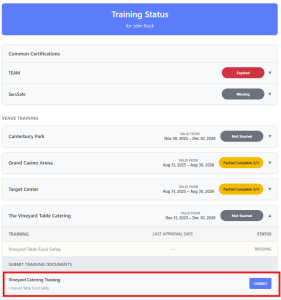
  1. Go to the Training Center.
  2. Locate the Vineyard Table Food Safety section.
  3. Click the Submit button under “SUBMIT TRAINING DOCUMENTS” (see image below).

Once finished, you will receive a status notification from JotForm. Please review the Training Center for updates to your profile.

US Bank Stadium Training is done for the year. 

We should start training for the 2026 season in summer of 2026.

The ServSafe Alcohol Service Training is a comprehensive three-hour program required for all volunteers at several of our venues. Additionally, this certification is a mandatory requirement for managers at Allianz Field.


ServSafe Alcohol Training Instructions

Every volunteer is responsible for creating their own account and paying for their training directly through ServSafe.  At the end of this process, you must download a PDF to submit back to us as documentation of your certification. 

Steps to Purchase Your Course

  1. Create a Profile: Visit www.servsafe.com and select “Create Account.”
    If you already have a profile, simply log in.
  2. Access Alcohol Section: After you are logged in, click on ServSafe Alcohol on the top navigation bar.

ServSafe Top Navigation

  1. Select Your Location: Enter MINNESOTA for the state and click Submit.

Select Minnesota

  1. Add to Cart: Add the ServSafe Alcohol Online Course and Primary Exam – 3rd Edition to your cart.

Shopping Cart

  1. Apply Discount (Levy Venues Only): Click “View Your Cart.” If you are training for a Levy venue (Target Center, Grand Casino Arena, or CHS Field), enter LEVY23 in the coupon code field and click Apply Coupon.

    Note: This code gives you a 32% discount.

Please Note: This code is exclusively for Levy locations and use is strictly tracked. Unauthorized sharing or use of this code may result in the dismissal of the individual volunteer and their associated non-profit group.

  1. Checkout: Click Checkout, enter your payment information, and select Continue to finish your purchase.

Step-by-Step: Completing Your Training

Phase 1: The Online Course

  • Access the Training: Hover over ServSafe Alcohol in the top menu and select “Take Online Course.”
  • Start Training: Locate the ServSafe Alcohol course in your dashboard and click “Launch.”
  • Complete Modules: Finish all training modules to prepare for the final test.

Phase 2: The Final Exam

  • Start the Exam: Once the course is finished, click on “Take Online Exam.”
  • Select Exam Type: Choose the “Primary ServSafe Alcohol Exam.”
  • Begin: Your exam access code should populate automatically. Click “Continue” to start.

After the Exam

  • Results: You will be notified immediately if you passed or failed.
  • Get Your Certificate: After 48 hours, your certificate will be ready. To download it, go to Certificates, then select View/Print Certificates.  From this screen, save this – it will be in the required PDF format to upload later.
  • Validity: Your certification is valid for three (3) years.

How to Submit Your Certificate

Once you pass the test and download the certificate as a PDF, you must upload it to our system.

  1. Go to our Training Center.
  2. Find the ServSafe row and expand it to reveal the Submit or Update button.

Submit Button

This will open a JotForm where you can Drag and Drop or browse to your ServSafe Certificate PDF. Click the box acknowledging our standard processing time to reveal the Submit button.

JotForm Upload

You will receive email updates regarding your submission. Once approved, your status will be reflected in the Training Center. If there is a problem with your submission, we will reach out to you.

TEAM Training is not available at this time. 

Training for the 2026-2027 season will be out in July or August of 2026. 

The Minnesota Alcohol Seller Server Course from servingalcohol.com is a comprehensive two-hour program required for all volunteers at Mystic Lake Amphitheater.


Minnesota Alcohol Seller Server Instructions

Every volunteer is responsible for creating their own account and paying for their training directly through servingalcohol.com.  At the end of this process, you must download a PDF to submit back to us as documentation of your certification.

  1. Open https://servingalcohol.com/minnesota-alcohol-seller-server-course/
  2. Click the Enroll Now button
  1. Enter your email address

  1. Click on the red Purchase Course button

  1. Click the “Have a discount code” button button


  1. Enter discount code epad26 and click Apply
  2. Click the red Continue Button
  3. Enter your payment information and click the red Complete Purchase button
  4. Enter your personal information (including date of birth)
  5. Start the Alcohol Seller Server Course
  6. Complete the training, take the test, download a copy of your certificate
  7. Upload your certificate using the Submit button located under the Common Certifications within the Training Center on the Achieving Dreams web site.

If you have any questions, please direct them to training@achievingdreamsmn.org.

Need Help?

If you need help, please reach out to the appropriate area.